Skip to content

Now in private beta for Windows 10 and 11

Total control over your hardware.

Live temperatures, load and clock speeds, refreshed every second. See your CPU, GPU and memory in a clear interface you can make your own.

Opens an email draft. Free during the beta.

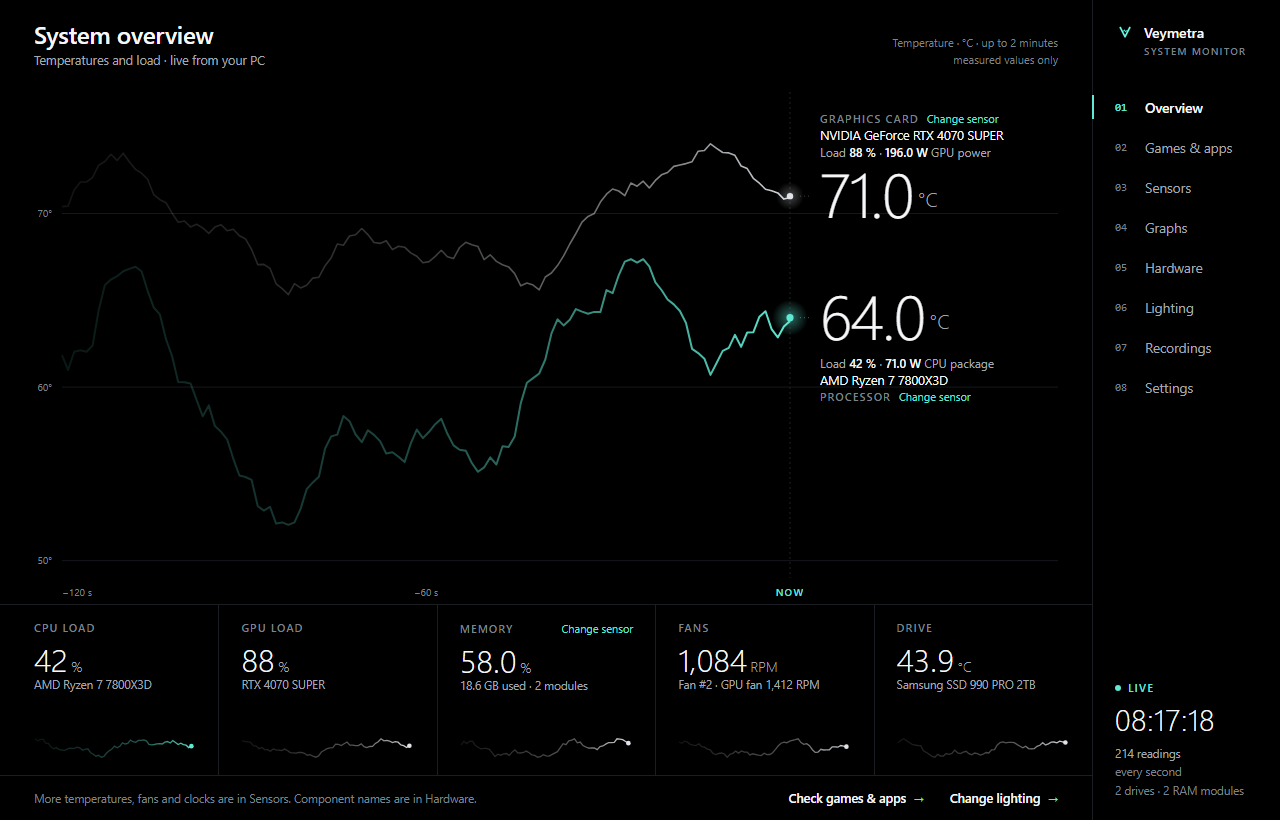
OLED Black design: a true-black system overview with two fading temperature traces, large current values and a right-hand menu. Readings are examples.

OLED Black: design concept with example readings.

Watch it move.

A graph like the one in the app. Point at it to read any second, switch traces on and off, or start a game and watch the load climb. The readings are simulated on this page.

Live · one sample per second

Everything you need, nothing you don't.

Three things Veymetra does well, without asking for your attention.

Live readings, every second

Temperatures, load, clock speeds, fan speeds, voltages and power from your CPU, GPU, memory, motherboard and drives, refreshed about once a second. Filter, search, star favourites and export everything to CSV.

CPU temperature, clocks and power need administrator rights plus the optional sensor driver that ships with the app.

Built to stay out of your way

A native Windows app with no browser engine inside. Window animations pause while minimized, graph history lives in fixed-size buffers, and you can switch animations off entirely.

Monitoring, warnings, the overlay and recordings keep running in the background either way.

Your overlay, your values

Pin up to twelve values on top of your game: CPU and GPU temperature, RAM use, FPS and any sensor you've starred. Clicks pass through it, a hotkey hides it, and game profiles switch the values automatically.

FPS comes from the bundled Intel PresentMon and may need administrator rights. Exclusive-fullscreen games can hide any desktop overlay.

Inside the app.

Two of the eight pages, shown in the OLED Black design. Pick another design and the tour changes with it.

  1. 1CPU, GPU and memory at a glanceTemperature, load and power where your hardware reports them.
  2. 2Tiles you can repointClick a tile to show any other sensor in its place.
  3. 3Two minutes of historyCPU and GPU temperature on one shared timeline.
OLED Black design: a true-black system overview with two fading temperature traces, large current values and a right-hand menu. Readings are examples.
OLED Black · Overview, example readings.

Six designs. Pick yours.

Each design re-skins every page of the app. Try one here and this website changes with it.

Switch any time in the app under Settings, Appearance.

Light where it counts.

No Electron, no hidden update timers, no analytics. Veymetra does its one job with the plain Windows toolkit and leaves the rest of your PC to your game.

  • Native Windows appWritten in C# with Windows Forms. No Chromium, Electron or WebView runs underneath the interface.
  • Quiet when minimizedWindow animations and scrolling graphs stop while Veymetra is minimized. Sensor monitoring, heat warnings, the overlay and recordings continue.
  • Bounded graph memoryLive graphs keep the last 10 minutes in fixed-size buffers. Longer sessions go to recordings, written to disk as they run, up to two hours each.
  • No background polling for updatesVeymetra checks for a new version when it starts and when you ask. Nothing installs until you click.
FootprintPreview build 7.11.29
Veymetra app
2.3 MB

The main executable.

Program folder
≈ 50 MB

About 33 MB of that is the bundled OpenRGB lighting tool.

Sensor refresh
every second
Graph history in memory
10 minutes
Browser engine
none
Telemetry in Veymetra's code
none

Start monitoring today.

Freeduring the beta

  • Live sensors, graphs and recordings
  • Six interface designs
  • In-game overlay with FPS
  • Signature-verified in-app updates
  • Windows 10 and 11, 64-bit
  • Invite-only; a GitHub account is needed
Request beta access

Opens a draft to [email protected] in your email app. Add your GitHub username and Windows version, then send it yourself. Requests are reviewed one by one. No payment needed.

Questions, answered.

Something else? Write to [email protected].

Which versions of Windows are supported?

64-bit Windows 10 and Windows 11. Veymetra runs on .NET Framework 4.7.2 or later, which Windows 11 and Windows 10 version 1803 and later already include.

How do I get access to the private beta?

Send an email with your GitHub username and your Windows version. If there is a place, you are invited to the private download repository and sign in from the app with a short code on github.com. During the beta, Veymetra needs an internet connection each time it starts to confirm your access.

Does Veymetra need administrator rights?

It starts with standard user rights. CPU temperature, clock and power readings need administrator rights and the optional PawnIO sensor driver, whose official installer ships with the app. FPS measurement may need administrator rights too. You can decline both and still see everything else.

What does Veymetra send over the internet?

Only what it needs: GitHub for beta access and updates, the Steam store for the game requirements you look up, and PassMark for CPU and GPU comparison lists. Your sensor readings, hardware details, settings and recordings stay on your PC. Veymetra's own code contains no telemetry, analytics or crash reporting.

What does it cost?

Nothing during the beta, and requesting access is free as well. Pricing for the 1.0 release has not been decided; testers will hear about it first.

Does this website read my PC's sensors?

No. The app image shows example readings, and the site stores nothing in your browser.

OLED Black design